How can it help media production cope with rising HDD and flash storage prices?
Media production starts with a critical step: ingesting content. Whether you’re working with footage from digital cinema cameras, broadcast systems, drones, or audio recorders, the first challenge is ensuring that newly captured media is stored securely and made available for production. That’s where an ingest archive comes in.
An ingest archive is the first secure repository for media assets after they have been imported into the production environment. Archiving media to LTO tape at the beginning of the workflow enables editors to work with proxy clips while significantly reducing the production storage capacity required. It also provides numerous additional benefits. Learn how to build an ingest archive using Archiware P5.
Archiware P5 is a modular data management platform that enables secure ingest archive workflows for media production. It combines archive, backup, and synchronization in a single solution, protecting media assets from the moment they are ingested through long-term preservation.
Why is an Ingest Archive Important and How Can It Reduce Costs?
The amount of content created in media production continues to grow rapidly. Losing even a single day’s footage can lead to expensive delays and reshoots. At the same time, rising prices for both HDD and flash storage, combined with supply constraints, make expanding production storage increasingly difficult and expensive.
An ingest archive provides several key benefits:
- Immediate protection of newly captured media
- Offsite storage of LTO archive media
- Offline and air-gapped protection against cyber threats
- Efficient proxy-based production workflows
- Reduced production storage capacity requirements
- The lowest cost per terabyte of any professional storage technology
- Efficient conform from LTO by restoring only the files referenced in the project file or EDL
- Easily scalable storage by simply adding LTO tapes
- Reduced power consumption and cooling costs
By archiving files immediately after ingestion, production teams create one or more secure copies that can be stored both offline and offsite. Proxy files are generated, allowing editors to begin working immediately. This significantly reduces the risk of data loss caused by accidental deletion, hardware failures, cyber attacks, or other unforeseen incidents.
A quote from storage specialist Carl Watts highlights one of the often overlooked advantages of LTO tape:
“Tape was never the answer to every storage problem. It remains a very good answer to one specific problem: retaining enormous quantities of infrequently accessed data without turning the data center into a power plant with a storage hobby.”
— Carl Watts
Significant cost savings can be achieved by using LTO tape instead of continuously expanding expensive high-performance production storage. In many cases, expanding production storage may not even be feasible because of supply shortages and sharply increasing prices for HDD and flash storage.
How Archiware P5 Archive Supports Ingest Archive Workflows
The core component for long-term preservation is P5 Archive. As soon as media is ingested, P5 Archive can automatically create a protected archive copy on LTO tape. Optionally, up to three archive copies can be created on any combination of LTO, disk, or cloud storage. This ensures that all valuable footage is protected from the very beginning.
Archiware P5 manages LTO storage, whether using a single desktop drive or a tape library with multiple drives. Multiple drives can be used to perform several archive and restore jobs simultaneously. Scaling archive infrastructure is straightforward, as Archiware P5 supports tape drives and libraries from all major vendors.
P5 Archive maintains searchable catalogues of archived assets. Editors and archive managers can browse archive contents without restoring entire datasets, making it much faster to locate projects months or even years later. Customisable metadata further improves searchability and simplifies media asset management.
P5 Archive offers a powerful and flexible feature: custom preview converter scripts. This capability allows to automatically generate proxy files during the archiving process, seamlessly integrating archive and production workflows. See details in this article.
The Final Step: Conform from LTO
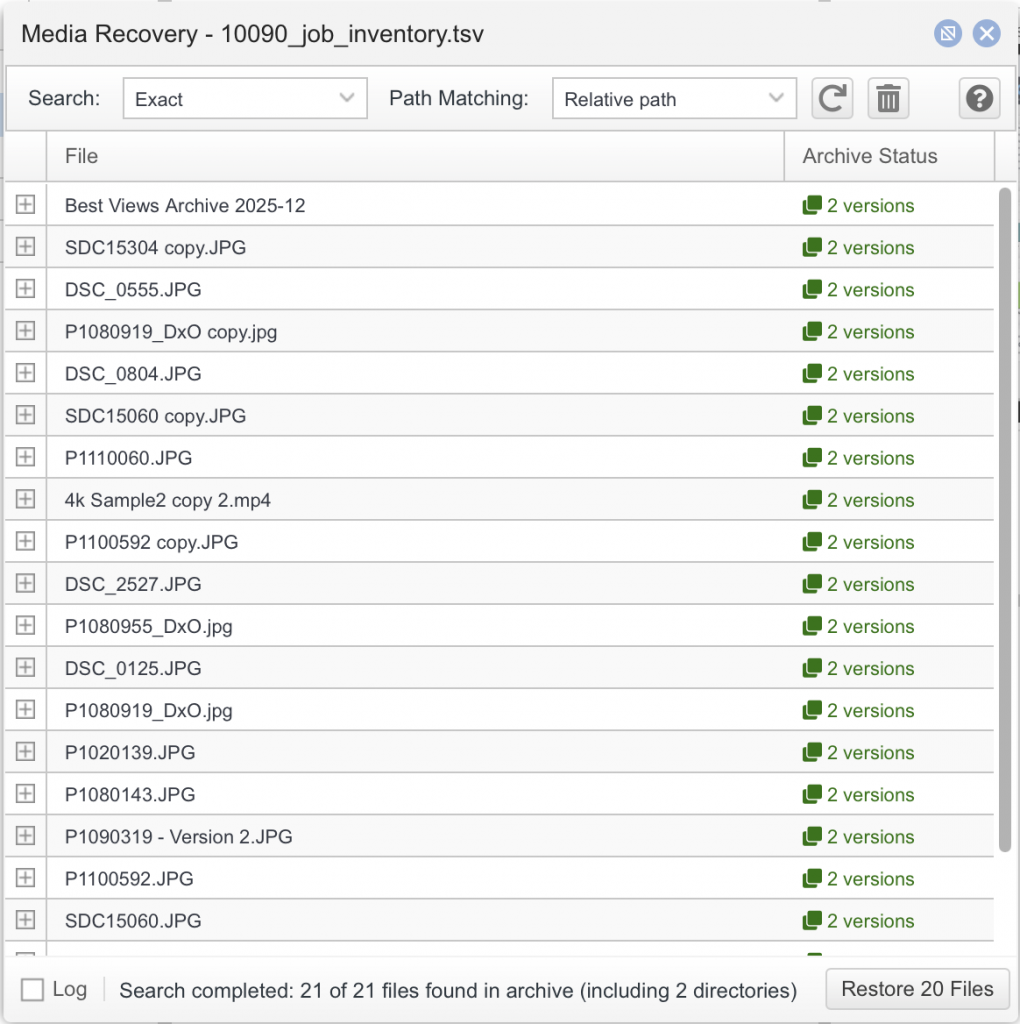
Archiware P5 Archive’s Project Restore feature makes it possible to restore only the media files used in the final edit. Alternatively, it can restore all files belonging to a specific archive job by using a job inventory file created in P5.
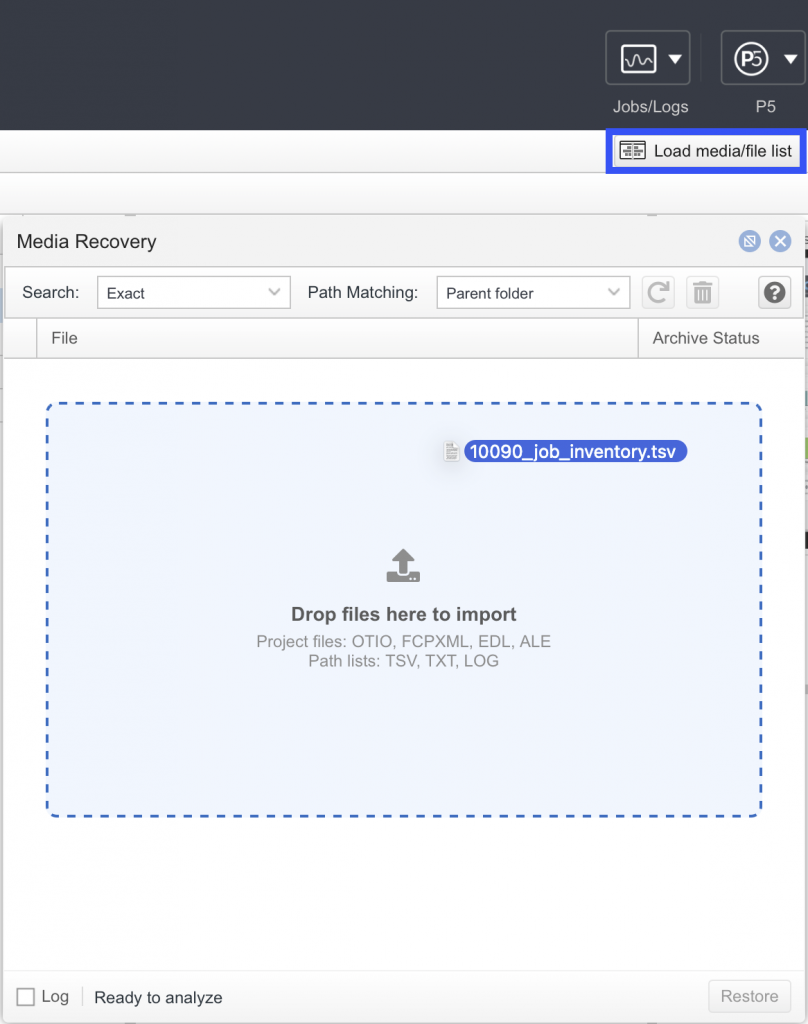
Restore from P5 Archive using a project file:
- Select Restore in the top section of the P5 interface.
- Click Load media/file list.
- In the window that appears, drag and drop the appropriate OTIO, FCPXML, EDL, ALE, TSV, TXT, or job log file.
- All files referenced by the project, including available versions, are displayed and can be restored by clicking Restore.

Backup and Archive: Better Together
While an ingest archive protects newly acquired media for long-term retention, active production files also require continuous protection. P5 Backup complements P5 Archive by safeguarding production storage throughout the editing and production process.
Together, backup and archive provide a comprehensive data protection strategy. Backup enables rapid recovery from accidental deletion, hardware failure, or ransomware, while the archive preserves original camera files and completed projects for future reuse, compliance, or monetisation.
Building a Future-Proof and Flexible Archive
Building an ingest archive is the first step towards long-term preservation of media assets. As production requirements evolve, storage strategies often change as well. To keep the archive flexible for future needs, the P5 Archive DLM add-on provides policy-based migration, replication, and verification for P5 Archive. This allows archive data to be moved seamlessly between storage technologies while the archive catalogue remains unchanged and fully searchable.
Archiware P5 Archive can serve as an ingest archive, a long-term preservation solution, and, when combined with P5 Backup, a comprehensive production data protection platform. An ingest archive provides both significantly improved data security and substantial cost savings compared with expanding production storage alone. The resulting proxy workflow can further increase production efficiency. Using the archive for completed projects creates a single source of truth—the organisation’s long-term media repository—providing additional security, accessibility, and value. Long-term storage flexibility throughout the archive lifecycle is ensured by P5 Archive DLM, Archiware’s lifecycle management add-on.
Test Archiware P5 in your own environment with a 30-day trial licence.

